
Home Networking / Wi-Fi Planning / 7 min read
UniFi vs Consumer Mesh Wi-Fi for Large Coastal Homes
Mesh can solve simple coverage problems. Large coastal homes usually need a wired access point plan, not more countertop hardware.

Short answer
UniFi is usually the better long-term choice for large coastal homes when access points can be wired, while consumer mesh is a quick fix for smaller spaces or homes where wiring is not practical.
01
Mesh nodes are easiest to buy, but wired access points are easier to trust.
02
Outdoor living spaces and garages should be part of the Wi-Fi plan from the start.
03
A central switch and PoE design keeps equipment cleaner than scattered plug-in nodes.
Network Choice
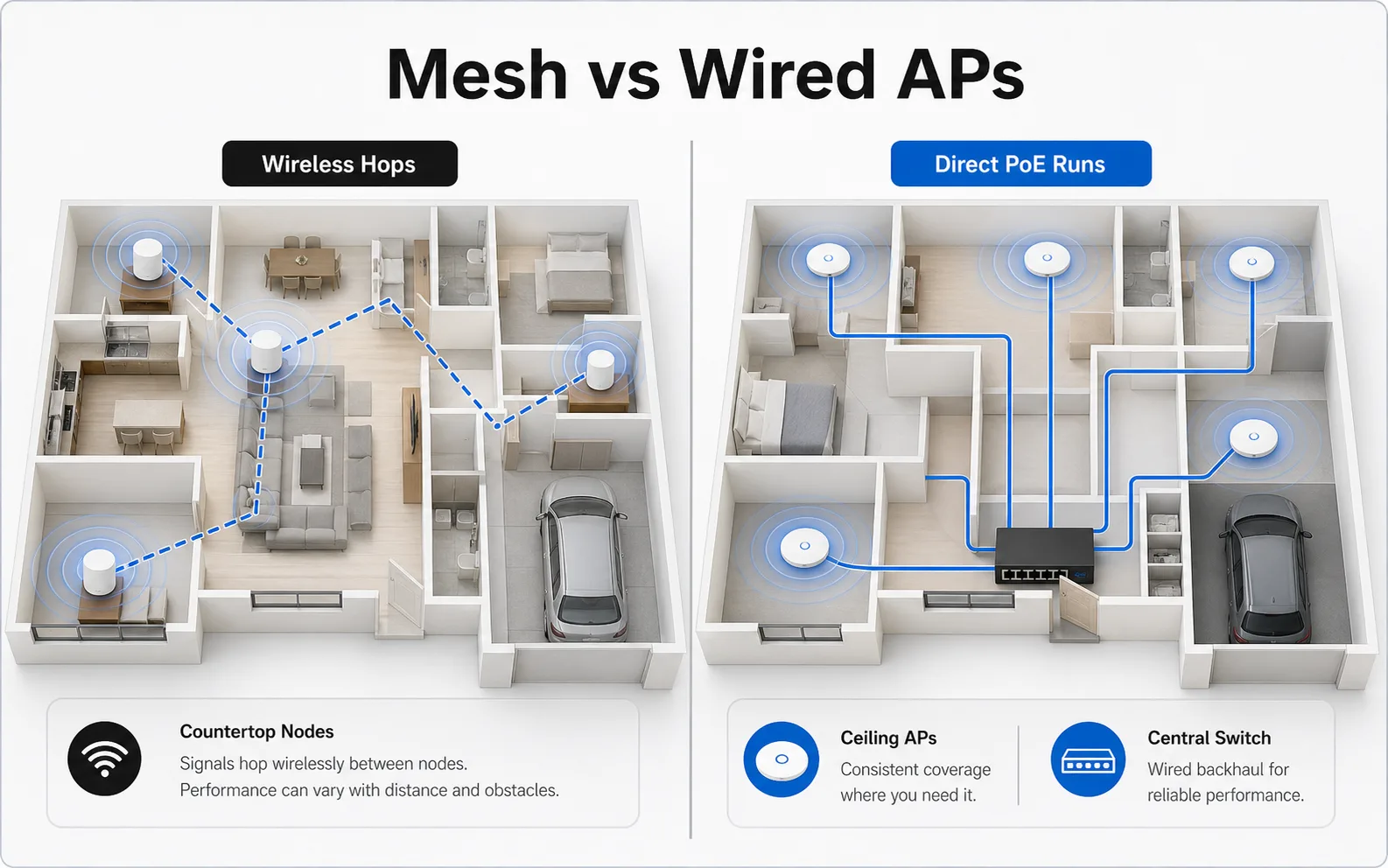
Mesh nodes add hops; wired access points remove them
The practical difference is the path back to the network closet. Wireless hops add variables. Wired access points use a direct PoE run.
- Wireless backhaul
- Countertop nodes
- Wired PoE
- Central switch
- Cleaner support path
Decision Guide
Choose mesh for convenience, choose UniFi for a planned home network
Consumer mesh systems are made to be simple. That is their strength. You can place a few units around the house, follow an app, and improve coverage in an afternoon.
The tradeoff is control. A larger home often needs predictable access point placement, wired backhaul, VLAN-ready switching, clean camera support, and room to grow. That is the UniFi lane.
The real issue is wireless backhaul
A mesh node has to talk to your devices and back to the rest of the network. If that backhaul is wireless, the node is still fighting distance, walls, appliances, and interference.
A wired access point gets a direct path back to the network closet. That does not make every house perfect, but it removes one of the biggest variables.
Where large homes expose the difference
The difference shows up in primary suites, garages, detached spaces, lanais, pool decks, and upstairs rooms above dense framing. These are exactly the spaces where homeowners notice buffering, dropped video calls, and camera connection problems.
A floor-plan review can identify those areas before hardware is purchased.
FAQ
Common homeowner questions.
Is mesh Wi-Fi bad?
No. Mesh is useful for many homes. It becomes less predictable when a large home depends on wireless links between nodes instead of wired access points.
Can mesh systems use wired backhaul?
Some can. If you are already planning wired backhaul, UniFi often gives you cleaner access point, switching, camera, and management options.
What should a homeowner check before buying Wi-Fi hardware?
Check the floor plan, existing ethernet drops, utility-room space, outdoor coverage needs, camera locations, and whether access points can be wired.
Tech Techr LLC
Need a floor-plan review before hardware is purchased?
Tech Techr designs, configures, documents, supports, and coordinates UniFi Wi-Fi and camera technology packages for homes across Freeport, Hammock Bay, and the Emerald Coast.
Schedule a home network consult