
Support / Home Networking / 6 min read
UniFi Remote Support: What a Tech Techr Support Call Looks Like
A remote support call starts with secure access, a review of the network map and alerts, then a clear fix or plan, documented so the next call starts from a known-good state.
Short answer
A Tech Techr remote support call starts with secure remote access to your UniFi system, a check of the network map and recent alerts, then a clear fix or plan, with the result documented so the next call starts from a known-good state.
01
Remote support works through UniFi's cloud management, so most issues are handled without a truck roll.
02
A support call reviews the network map, recent alerts, and device health before changing anything.
03
Every change is documented so the system's history stays clear for the next call.
Support Flow
What a remote support call looks like
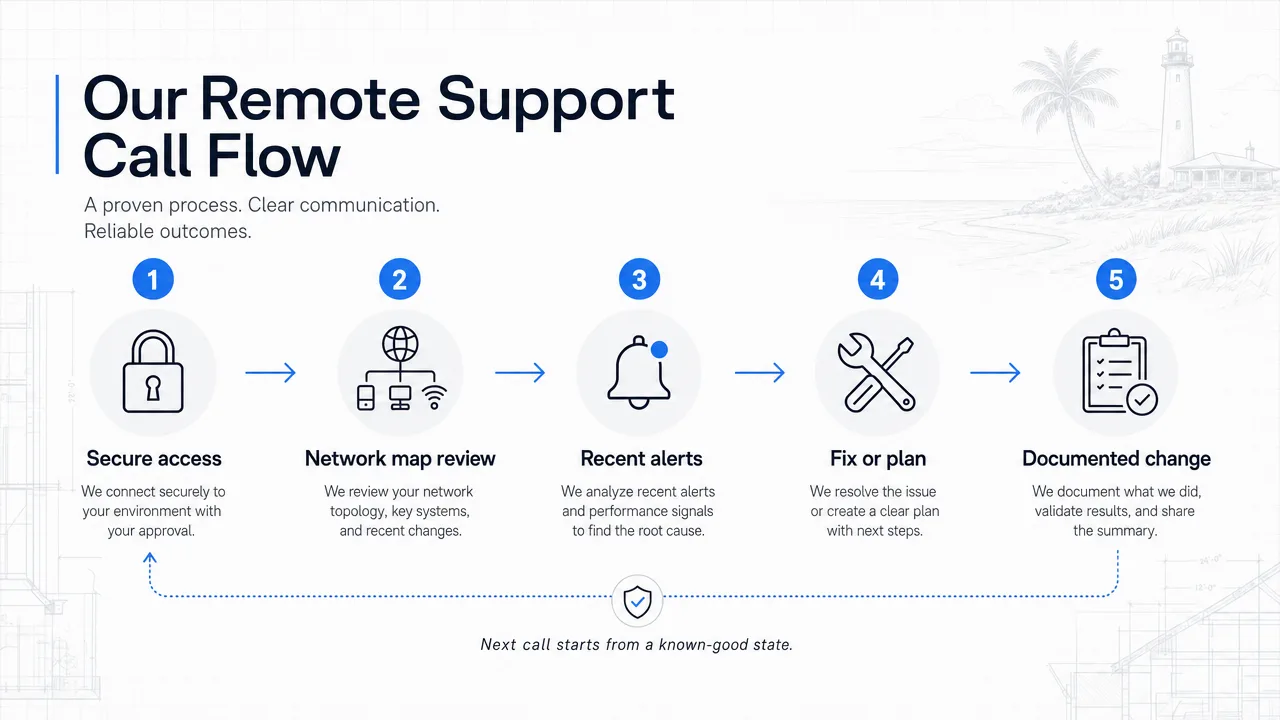
Secure remote access, a review of the network map and alerts, a clear fix or plan, and documentation so the next call starts from a known-good state.
- Secure access
- Network map review
- Recent alerts
- Fix or plan
- Documented change
Remote Support
Most issues do not need a truck roll
Because UniFi systems can be managed remotely through UniFi Site Manager, a large share of support issues are handled without anyone driving to the house. A dropped access point, a camera that went offline, or a settings question can often be resolved from a laptop.
That keeps support fast and keeps the homeowner from waiting on a schedule for a simple fix.
A call starts with the map, not a guess
A useful support call begins by looking at the real system: the network map, device statuses, recent alerts, and the documentation from the original install. Guessing at settings over the phone is how small problems become big ones.
From there the fix is usually clear, a reboot, a configuration change, a firmware update, or a plan for a physical issue that needs a licensed partner on site.
Every change gets documented
The difference between one-off support and a maintainable system is documentation. When a change is made, it is recorded so the system's history stays clear.
That means the next call starts from a known-good state instead of rediscovering what was already tried.
FAQ
Common homeowner questions.
Can you fix my network without coming to my house?
For most UniFi issues, yes, remote management handles configuration, alerts, and device health without a truck roll. Physical issues are coordinated with licensed partners.
What do you look at first on a support call?
The network map, device statuses, recent alerts, and the original install documentation, so the fix is based on the real system instead of a guess.
Is remote access secure?
UniFi remote management uses secured cloud access with controlled permissions. Access is limited to what is needed for the support task.
Tech Techr LLC
Need a floor-plan review before hardware is purchased?
Tech Techr designs, configures, documents, supports, and coordinates UniFi Wi-Fi and camera technology packages for homes across Freeport, Hammock Bay, and the Emerald Coast.
Schedule a home network consult