
Home Networking / UniFi Hardware / 6 min read
PoE Switch Sizing for UniFi Access Points and Cameras
A PoE switch is sized by total power budget and the PoE standard each device needs, not just by counting ports. Here is how to plan it with headroom.
Short answer
A PoE switch has to provide enough total power and enough ports for every wired access point and camera you plan, with headroom for additions, sizing it means adding up device power budgets, not just counting ports.
01
PoE switches are sized by total power budget, not just port count.
02
Match the PoE standard, PoE, PoE+, or PoE++, to what each access point and camera requires.
03
Leave headroom for future cameras and access points so the switch is not replaced next year.
Power Budget
Add up power, not just ports
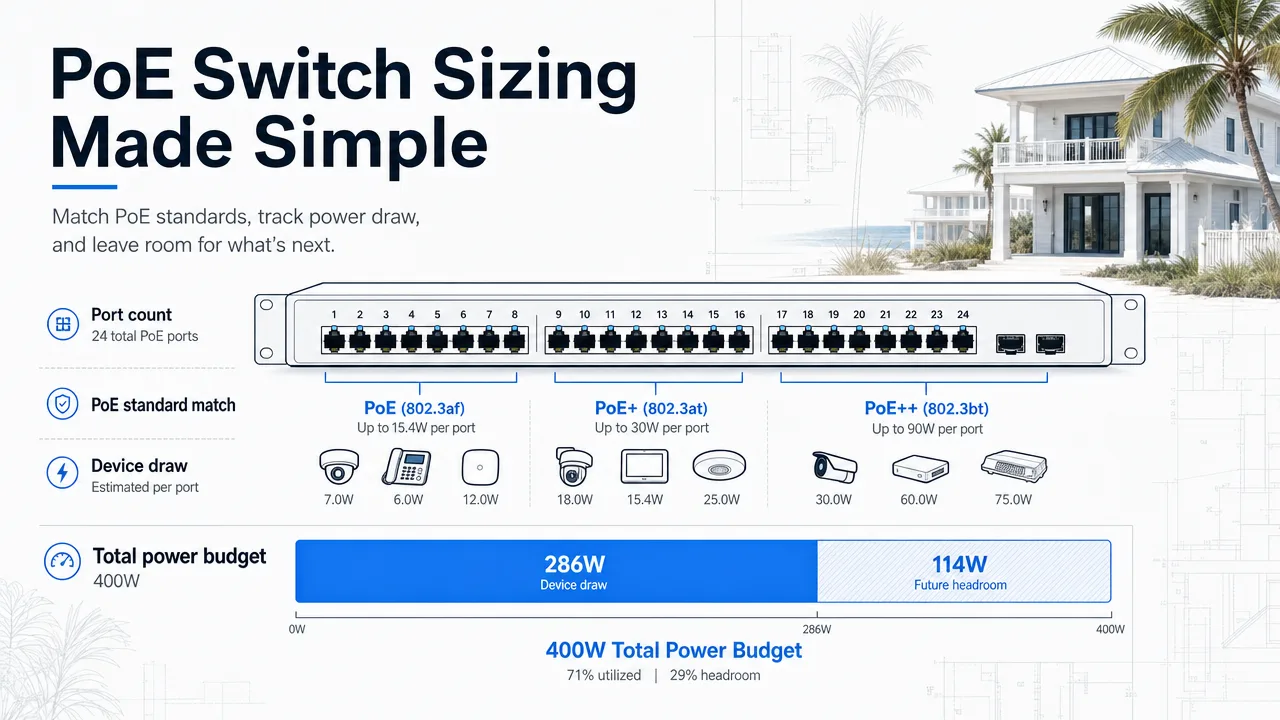
A PoE switch is sized by total power budget and the PoE standard each device needs, with headroom for the cameras and access points you add later.
- Port count
- Total power budget
- PoE standard match
- Device draw
- Future headroom
Power Budget
Ports are easy; total power is the real limit
A PoE switch sends power and data over the same ethernet cable, which keeps access point and camera locations clean. But each device draws a specific amount of power, and the switch has a fixed total budget.
A switch with 24 ports is not automatically a 24-device switch. If the total power draw exceeds the budget, some ports cannot deliver power even though they are physically empty.
Match the PoE standard to the device
Devices need different PoE standards, standard PoE, PoE+, or higher-power PoE++. A camera that needs PoE+ will not run reliably on a port that only provides standard PoE.
Reading the device specs and matching them to the switch capability prevents intermittent cameras and access points that drop off under load.
Plan for the cameras you have not bought yet
Switches are a long-lived part of the system. Sizing for today only usually means replacing the switch when a guest house camera or an extra outdoor access point is added.
A little headroom on ports and power budget keeps additions simple and avoids a surprise replacement a year later.
FAQ
Common homeowner questions.
How do I size a PoE switch?
Add up the power draw of every planned access point and camera, match the PoE standard each needs, and leave headroom for future devices.
What is the difference between PoE and PoE+?
PoE+ delivers more power per port. Some access points and cameras require PoE+ and will not run reliably on standard PoE.
Can I use a bigger switch than I need?
Yes. Headroom on ports and power budget is usually cheaper than replacing a switch when you add cameras later.
Tech Techr LLC
Need a floor-plan review before hardware is purchased?
Tech Techr designs, configures, documents, supports, and coordinates UniFi Wi-Fi and camera technology packages for homes across Freeport, Hammock Bay, and the Emerald Coast.
Schedule a home network consult