
The Tech Techr referral page gives homeowners and local partners a simple place to share a referral link, submit a project lead, and track the $250 finder’s fee from review through payout.

Short answer
Sign in to the referral page, copy your referral link or submit the homeowner’s project details, then use the dashboard to track whether the referral is submitted, active, installed, or paid.
01
Use the referral page for local installed-system referrals such as home networking, UniFi, cameras, and related system projects.
02
The dashboard shows the referral code, referral link, status counts, and submitted referrals in one place.
03
Eligible $250 finder’s fee payouts are sent as a digital Visa or Mastercard gift card after the referred system is installed.
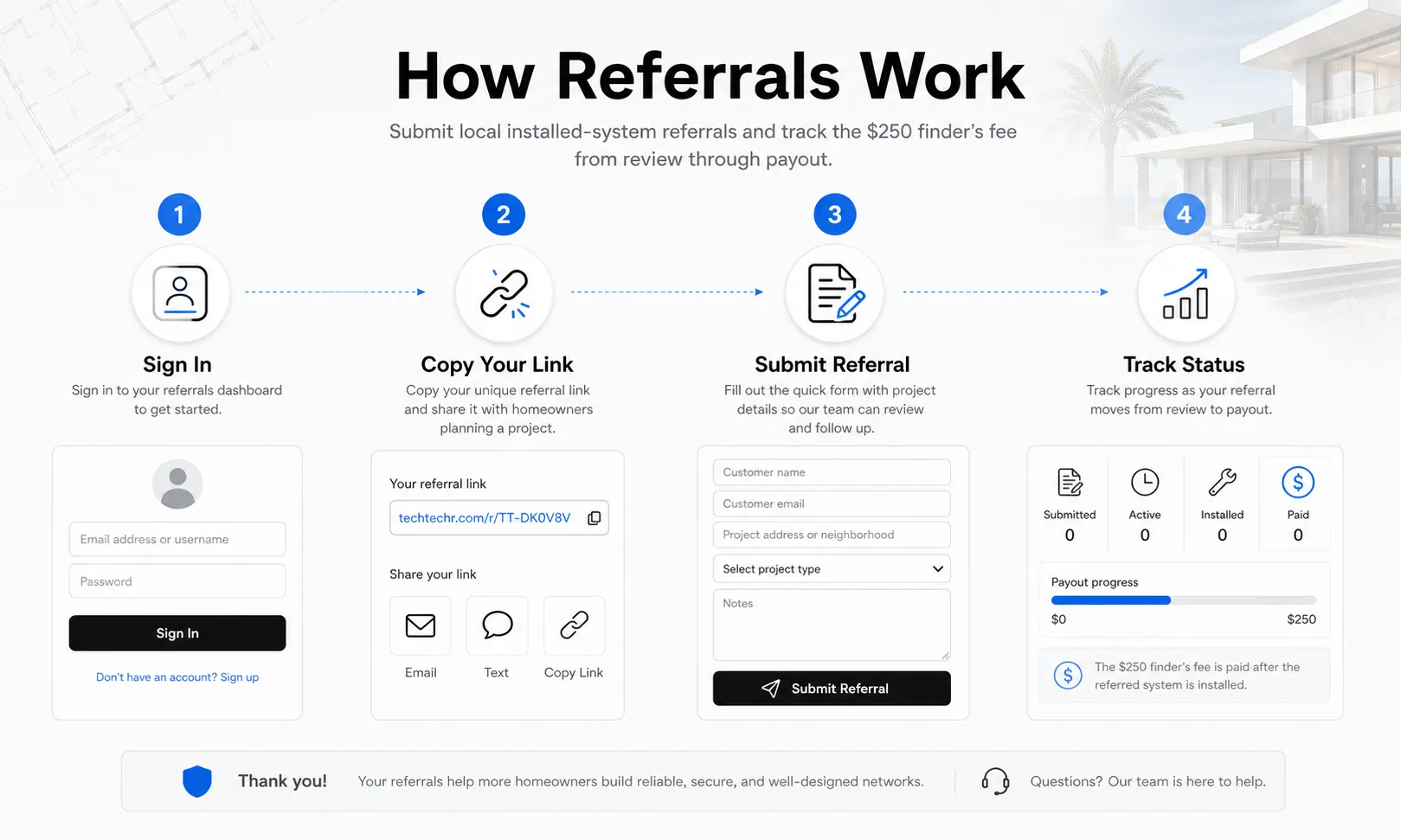
Referral Flow
How referrals move from sign-in to payout
The referral page keeps the process simple: sign in, copy your link or submit the referral form, then track progress from review through installed-system payout.
- Sign in
- Copy your link
- Submit referral details
- Track status
- Digital gift card payout
Getting Started
Sign in before submitting a referral
The referral page starts with a sign-in screen so each referral can be tied to the right person. You can sign in with Google or use an email address, depending on the options available to your account.
Once you are signed in, the dashboard shows your referral code, referral link, status counts, and the form used to submit a new referral.
Use the referral link or submit the project details
The easiest option is to copy your referral link and share it with a homeowner who is considering a home networking, UniFi, camera, or related system project. If you already have the homeowner’s details, you can submit the referral form directly.
The form is intentionally short: customer name, email, phone, project address or neighborhood, project type, and notes. Add enough context for Tech Techr to understand the request without turning the form into a long project brief.
Track the referral through the dashboard
The dashboard status cards are designed to show the referral moving through a few simple stages: submitted, active, installed, and paid. That makes it easier to see whether the referral has only been received, is being reviewed, has become an installed system, or has already been paid out.
For eligible referrals, Tech Techr sends the $250 finder’s fee as a digital Visa or Mastercard gift card after the referred system is installed. The terms page remains the source of truth for eligibility details.
FAQ
Common homeowner questions.
What kinds of referrals should go through the page?
Use it for local installed-system referrals related to home networking, UniFi Wi-Fi, cameras, and related residential technology projects in the Tech Techr service area.
How is the finder’s fee paid?
Eligible $250 finder’s fee payouts are sent as a digital Visa or Mastercard gift card after the referred system is installed.
What if I only have partial referral details?
Submit the details you have and use the notes field for context. A clear customer name, contact method, neighborhood or project area, and project type make follow-up easier.
Tech Techr LLC
Need a floor-plan review before hardware is purchased?
Tech Techr designs, configures, documents, supports, and coordinates UniFi Wi-Fi and camera technology packages for homes across Freeport, Hammock Bay, and the Emerald Coast.
Schedule a home network consult