
Home Networking / Security Cameras / 8 min read
Why UniFi Makes Sense for Large Hammock Bay and Freeport Homes
Large coastal homes need more than a single ISP router or a few mesh pucks. A planned UniFi system gives homeowners a cleaner way to handle Wi-Fi, cameras, local storage, and future expansion.

Short answer
UniFi makes sense for large homes when the network is planned around the floor plan, wired access point locations, camera coverage, and a central utility space instead of being patched together after move-in.
01
Hardwired access points are usually more reliable than wireless mesh hops in large homes.
02
UniFi Protect can support local camera recording without depending on consumer cloud camera subscriptions.
03
Planning from the floor plan and an in-home walkthrough helps avoid visible cabling, poor camera angles, and weak outdoor coverage.
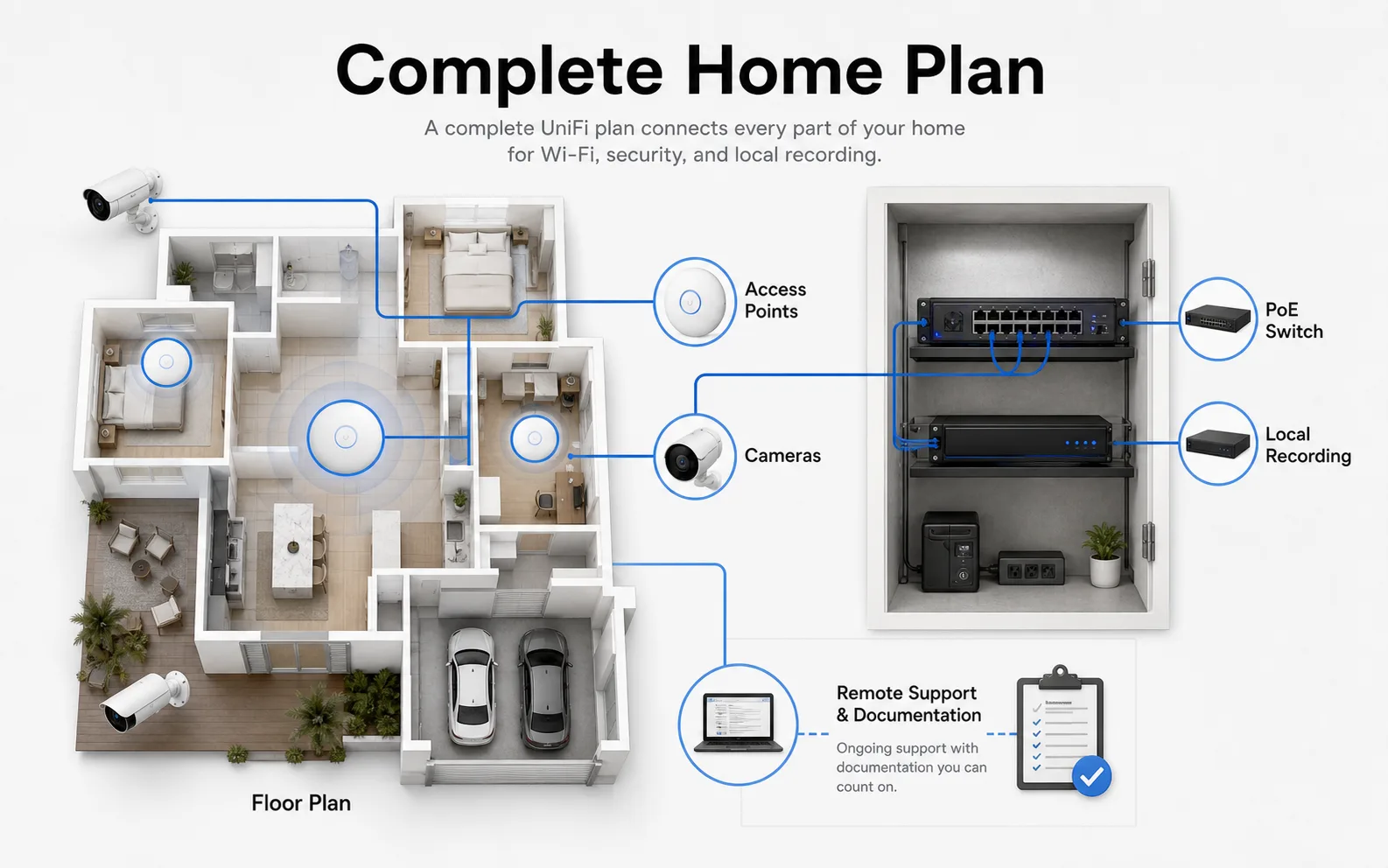
Planning Map
What a complete UniFi home plan connects
A useful home technology plan ties the floor plan, access points, cameras, utility room, local storage, and support documentation into one maintainable system.
- Floor-plan review
- Wired access points
- Camera sightlines
- PoE switch
- Local recording
The Planning Gap
Most homes get wiring before the network gets designed
Many homes include ethernet drops, but the drops are often treated as a checklist item. The useful design work happens when existing wiring, access point locations, camera sightlines, PoE switch capacity, and the utility-room layout are mapped into a system a homeowner can actually maintain.
That is where UniFi fits well. It is not just a stronger router. It is a coordinated network stack for Wi-Fi, switching, cameras, local recording, and remote support.
Why consumer mesh can struggle in coastal homes
Mesh systems can be useful in smaller houses, but they still depend on wireless links between nodes unless each unit is wired. Large floor plans, exterior walls, garages, outdoor kitchens, and second-story bedrooms all make those wireless links less predictable.
A cleaner UniFi design uses wired ceiling or wall access points in planned locations. The homeowner sees simple Wi-Fi. The system behind it has a better foundation.
Cameras should be planned like the network
A useful camera plan starts with entries, garage doors, side yards, driveways, docks, patios, and service areas. It should also account for soffit locations, night lighting, storage retention, and whether a camera angle respects neighbors and shared spaces.
Tech Techr focuses on the technology plan, hardware selection, configuration, documentation, and coordination with licensed partners where required for physical installation work.
FAQ
Common homeowner questions.
Is UniFi overkill for a home?
Not for larger homes, completed properties, or homes with cameras and outdoor living spaces. It can be more system than a small apartment needs, but it is a practical fit when the home needs planned coverage and local camera storage.
Can UniFi replace a mesh system?
Yes, when the home has or can support wired access point locations. A hardwired UniFi design avoids the wireless backhaul problems that often limit consumer mesh systems.
Does Tech Techr perform low-voltage installation work?
Tech Techr designs, configures, documents, supports, and coordinates UniFi technology packages. Physical installation work is coordinated through licensed partners where required.
Tech Techr LLC
Need a floor-plan review before hardware is purchased?
Tech Techr designs, configures, documents, supports, and coordinates UniFi Wi-Fi and camera technology packages for homes across Freeport, Hammock Bay, and the Emerald Coast.
Schedule a home network consult